
Chapter 1The challenge: one product, many prices, several companies
Chetan Foods sells everyday food staples over the counter and runs its business across more than one company in Odoo. Out of the box, Odoo assumes a product has one selling price. In a food business that idea falls apart within a week.
A bag of the same dal can arrive in three lots, each with a different MRP printed on it. Bulk stock gets repacked into 3 kg, 5 kg and 10 kg packs. Goods travel from the warehouse company to the retail companies. And at the counter, the cashier needs to know which batch they're selling, what it should cost, and whether it's really on the shelf.
Before we started, every one of those steps meant an extra document, some mental arithmetic or a workaround someone had invented. The brief we were given was short: make Odoo work the way Chetan Foods actually trades, and don't make the cashier's screen any harder to use.
Chapter 2Batch pricing, from purchase order to POS receipt
The most important development is that instead of being determined for each individual item, the pricing was done based on the quantity (batch). This can be explained as follows.
- When purchasing: The purchaser enters the MRP and the selling price directly into the purchase order line where both the data are present on the vendor invoice.
- Upon receipt: the small screen generates the lot. In case there is a lot existing with the identical MRP and selling price, that lot is used as is, to avoid breaking the same-priced items across many similar lots.
- During repackaging: When a manufacturing order converts a 1 kg bag into 250 g packs, Odoo recommends the new pack’s MRP and sales price on the basis of the batch that was consumed. Employees have the freedom to accept or modify the recommendation.
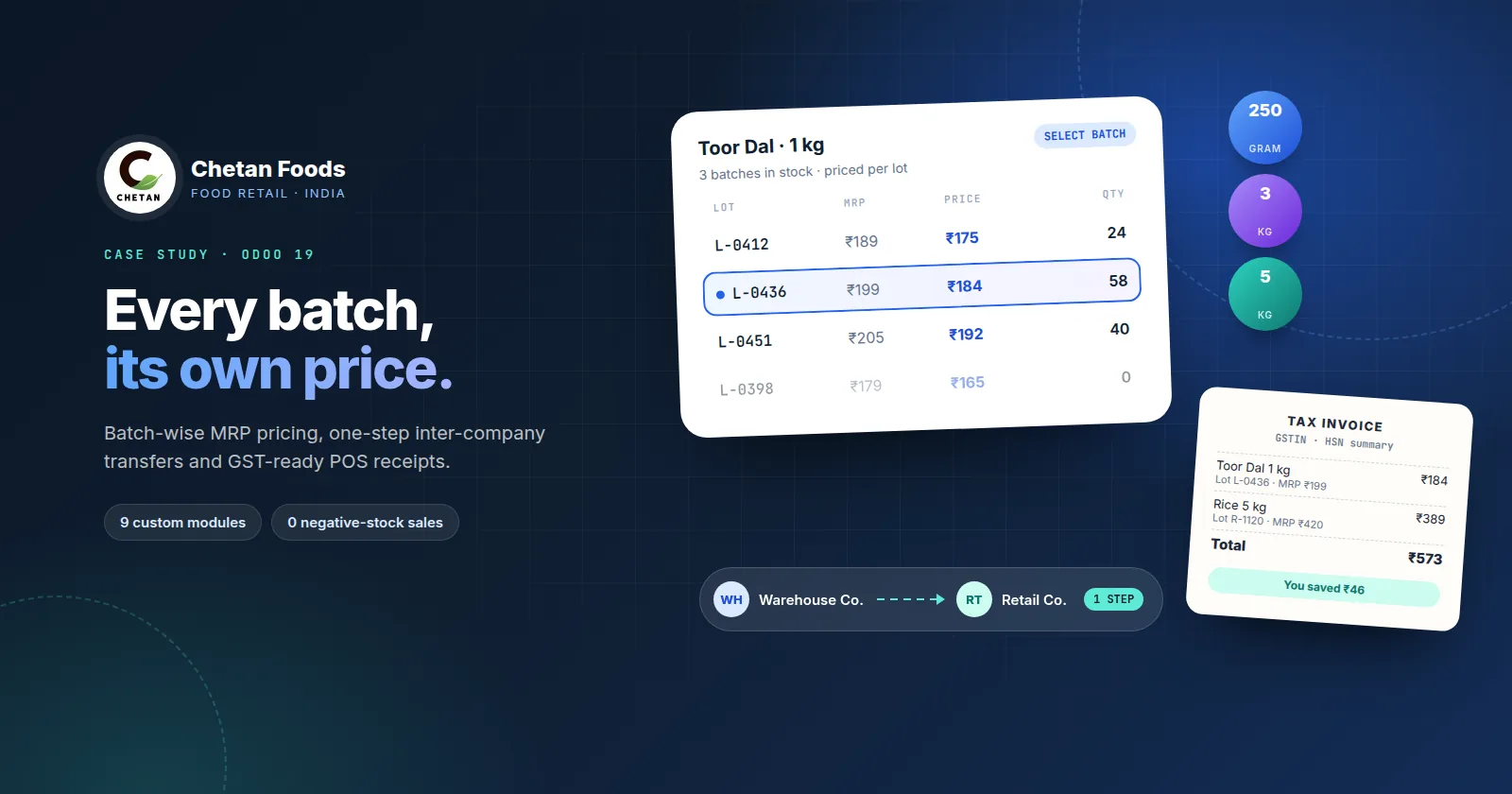
- At the counter: choosing a lot traceable item displays a small table of lots that contain their prices and available amounts. In case there is just one lot, then it will be selected by the cash register. Lots that have been exhausted in opened orders will not be displayed.
- On the receipt: the line takes its price from the chosen batch and prints that batch's MRP. Refunds go back at the original batch MRP, and the system won't let anyone sell above MRP.
Chapter 3Moving stock between companies in one step
In standard Odoo, sending stock from one company to another is a small chore. You create a delivery in the first company, switch companies, create a matching receipt in the second, and hope the two quantities agree.
We replaced that with a single transfer form. The user picks the source and destination company and location, adds the products and checks what's available. Our module then creates both the outgoing and the incoming document through Odoo's inter-company transit location. Partial deliveries are supported, and the whole history sits on one record.
Two smaller pieces made this safe to use every day:
- Safe cross-company access: a tightly scoped rule lets a warehouse user validate a delivery without switching into the other company. They can see the linked receipt, but they can't edit or delete the other company's records.
- Short-receipt alerts: if the receiving team counts fewer units than were sent, the warehouse managers get an email straight away, so a shortage is caught the same day rather than at month-end.
Chapter 4Pack sizes and units, without converting by hand
Chetan Foods sells the same food in several pack sizes. We gave each product variant its own unit of measure, so the 3 kg, 5 kg and 10 kg versions each behave properly in sales and in stock.
Odoo also works out a total for each product in its base unit. The team can see how much they really hold without adding up pack counts on a calculator.
Chapter 5Keeping the POS counter honest
A handful of focused changes protect margin and accuracy at the till:
- No negative stock: stock is checked before the cashier reaches payment, and the server checks again when the order arrives. The cashier sees every item that's short. Standard POS would have finished the sale and left the stock movement hanging.
- Locked prices: the price and discount keys are switched off, and so is creating products at the POS. Prices come only from batches and from approved promotions.
- Weekday promotions: offers can be limited to chosen days, say a staple at a special price every Monday, Wednesday and Friday. On the other days the normal price comes back on its own.
- An India-ready receipt: a tax-invoice layout with the company header, GSTIN, HSN summary, net quantity, amount in words, rounding, MRP and how much the customer saved.
Chapter 6The module line-up
Everything runs on Odoo 19 as small, separate modules. Each one can be upgraded or removed without touching the others, which matters a lot when the next Odoo version comes along.
- Batch Pricing: MRP and sale price per lot, from purchase and manufacturing all the way to the POS batch picker.
- Inter-Company Transfer: one form that creates both the outgoing and incoming stock documents.
- Chained Access & Short-Receipt Alerts: safe cross-company validation, with an email to warehouse managers when counts don't match.
- Contextual Security Policies: a thin technical layer enabling security policies to be aware of the process being executed.
- Variant Units of Measure: a separate unit for every pack size, with base-unit totals worked out automatically.
- Control without Negative Stocks: one guard in the storehouse and another guard in the POS.
- Weekday Promotions: a Monday-to-Sunday picker on loyalty and discount rules.
- POS Custom Receipt: GST invoice layout, HSN summary, amount in words and batch MRP.
- POS Customization: locked price, discount and product-creation controls at the counter.
Chapter 7What changed for Chetan Foods
Chetan Foods now prices what's actually on the shelf. Every batch carries its own MRP and selling price from the day it's received, so cashiers don't have to remember prices or trust a single product price that's wrong for half the stock.
Moving goods between companies takes one document instead of two, and a shortfall at the receiving end sends an alert instead of turning up as a surprise at month-end. Stock can't go negative at the counter, which keeps inventory and tax records lined up. And the receipt finally looks the way Indian customers and auditors expect it to.
Chapter 8What to do next
A lot of food retailers steer clear of customising Odoo because they're worried it will make every upgrade painful. Chetan Foods shows it doesn't have to. Small, well-scoped modules on a clean Odoo 19 base handle batch pricing, multi-company stock and GST billing without that risk.
If you sell the same product at different prices, repack bulk goods or move stock between companies, we'd be happy to map out a setup that fits. Book a free 30-minute scoping call and we'll come back with a clear implementation plan.